Checking your site's SEO performance usually means opening several tools — one for traffic, another for AI visibility, another for competitors.
The SEO Dashboard pulls the most relevant data from your project into a single view, so you can see how your site is performing without switching between tools.
Understanding SEO Dashboard
Use SEO Dashboard to:
- Monitor your site's SEO and AI visibility performance
- Track changes in organic traffic, keyword rankings, authority score, and AI mentions and citations
- Catch technical SEO issues affecting your site
- Check the health of your backlink profile and find link-building prospects
- See visits, engagement, and top pages using Semrush data or your connected Google Analytics account
- Review search performance — clicks, impressions, CTR, and position — from your connected Google Search Console account
- Monitor how your business listings appear across directories
- Compare your site's performance against competitors
Accessing SEO Dashboard
- Go to SEO > SEO Dashboard
- Select a project from the dropdown, or click + Create project to set one up
Click the arrow icon next to the project name to open your project's website, or point to Share to see how many people have access.
Key metrics and visualizations
Note: Each widget pulls its data from a corresponding Semrush tool or report and refreshes on that tool's own schedule, so update frequency varies by widget. Click View full report on any widget to open the full tool or report.
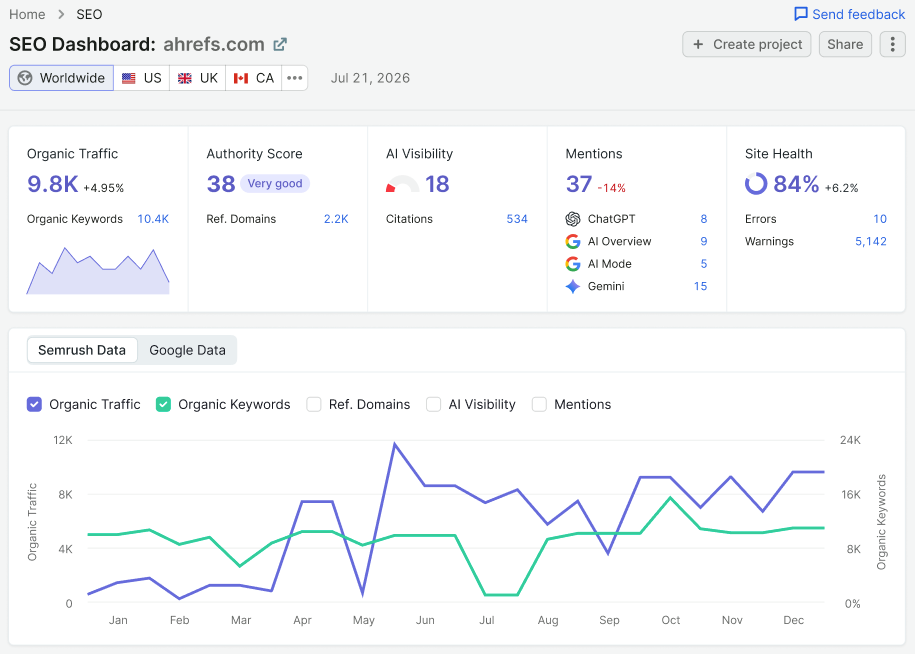
Find the key metrics at the top of the report.
|
Metric |
Definition |
|
Organic Traffic |
The number of users expected to visit the domain in the coming month if the current organic traffic flow stays the same |
|
Authority Score |
Semrush's proprietary metric measuring a domain's overall reputation, based on its backlink profile, organic traffic, and other factors |
|
AI Visibility |
Measures how often the brand appears in AI-generated answers relative to competitors' median mentions |
|
Mentions |
The total number of times the brand is mentioned in AI-generated answers, broken down by ChatGPT, AI Overview, AI Mode, and Gemini |
|
Site Health |
A percentage score based on the number and uniqueness of errors and warnings found during the site's last audit. A higher score means fewer problems, better search engine optimization, and a more user-friendly site. Includes Errors (highest-severity issues) and Warnings (medium-severity issues) found. |
Below the site overview panels, a chart plots up to 5 metrics over time: Organic Traffic, Organic Keywords, Ref. Domains, AI Visibility, and Mentions. Select which metrics to plot using the checkboxes above the chart, and switch between Semrush Data and Google Data using the tabs.
Site Performance
When you create a campaign in Position Tracking or Site Audit, Semrush adds a preview widget here so you can monitor progress without opening the full tool.
If a widget hasn't been set up yet, it shows a short description of what the tool does instead of your metrics, along with a Set up button to create the campaign directly from the SEO Dashboard.
Position Tracking
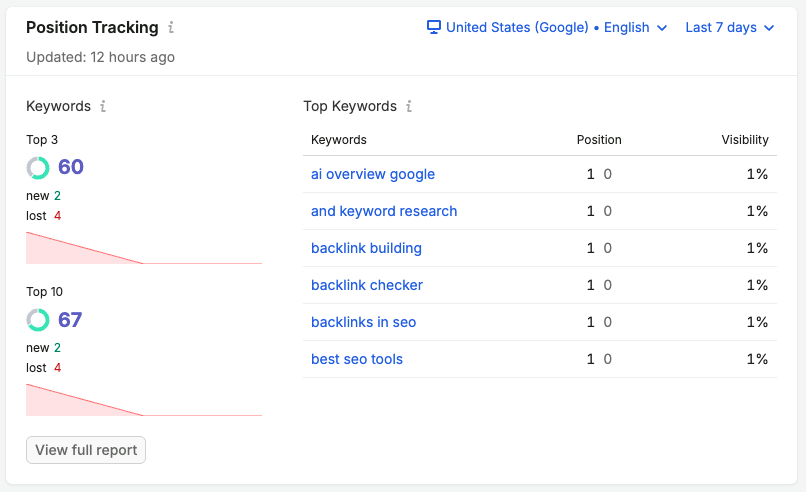
Shows how your tracked keywords rank. The widget shows how many keywords rank in the top 3 and top 10, with new and lost keywords for each, and a Top Keywords table with each keyword's Position and Visibility. You can edit the date range. See Position Tracking for more information.
Site Audit

Runs a technical crawl of your site and scores its overall health. The widget shows your Site Health score alongside the number of errors and warnings found, plus how many pages were crawled. See Site Audit for more information.
Analysis
Competitors
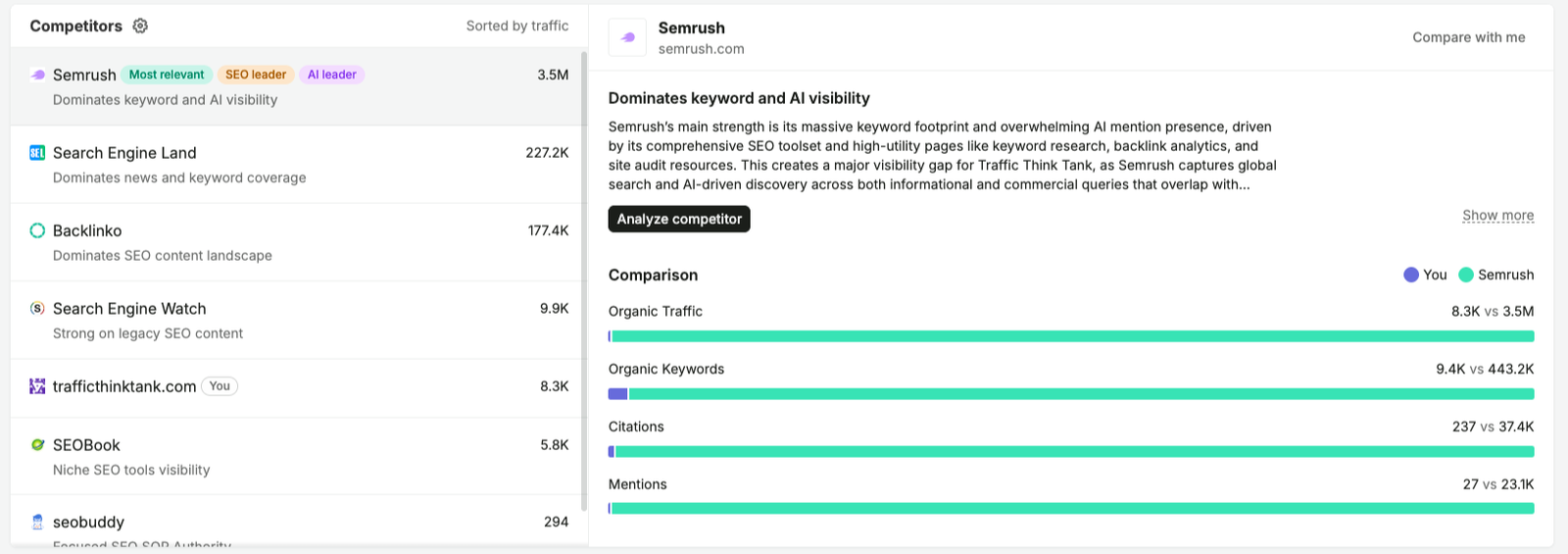
Lists your site and your top competitors, sorted by traffic, with tags such as SEO leader, AI leader, and Most relevant. Select a competitor to read a short summary of where they lead and compare your site against theirs across Organic Traffic, Organic Keywords, Citations, and Mentions. Click Compare with me to open Compare Domains or Analyze competitor to open Domain Overview.
Improvements
On Page SEO Checker
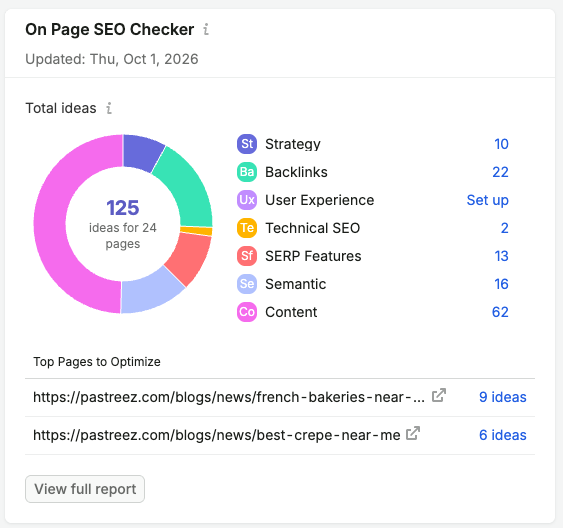
Scans your top pages against competitors ranking in Google's top 10 and suggests optimization ideas. Ideas are grouped by category — strategy, backlinks, technical SEO, and more — with a total count and a list of your top pages to optimize. See On Page SEO Checker for more information.
Backlink Audit
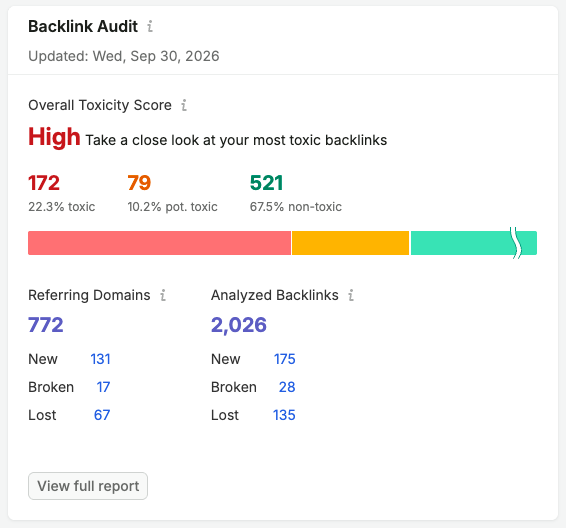
Analyzes your backlink profile and flags toxic links that could hurt your rankings. The widget shows your Overall Toxicity Score, referring domain and backlink counts, and a list of your most toxic backlinks. See Backlink Audit for more information.