ChatGPT is one of the most-used AI platforms on the web — and it’s starting to drive more web traffic.
Semrush’s analysis of 17 months of clickstream data found that outbound referral traffic from ChatGPT grew 206% in 2025.
But how much traffic from ChatGPT are you getting? And are your competitors getting more of it?
We asked SEO experts how they think about ChatGPT traffic and put together a guide on how to actually measure traffic from ChatGPT, so you can identify opportunities to improve.
Why ChatGPT traffic matters
Visitors from ChatGPT arrive differently than visitors from organic search. By the time someone clicks through an AI response, they've already done plenty of research. They likely know more specifically what they want and why they want it.
That changes the nature of the lead. Bek Drayton, Founder at BeKonstructive Marketing, sees it firsthand.
From my personal experience, the leads we’re seeing come in from AI referral sources have pre-qualified themselves. They aren’t asking for a quote. They’re asking, “When can we get started?”
How to track your ChatGPT traffic
You can monitor your own ChatGPT traffic in Google Analytics 4 (GA4).
In GA4, you can see which pages attracted visits from ChatGPT, how engaged users were once they arrived on your site, and whether they completed any conversions (these are called “key events” in GA4).
Note: AI platforms don’t always pass referrer information, so some traffic from AI tools might appear as direct traffic.
Open your GA4 property and go to the “Traffic acquisition” report.

Click the drop-down at the top of the table and change it to “Session source/medium.”

Click “+ Add filter” in the top left, then set the “Dimension” drop-down to “Session source,” set the “Match Type” drop-down to “exactly matches,” and click the box next to “chatgpt.com” in the “Value” drop-down.

You’ll then see any sessions that came to your site from ChatGPT.
To see the exact pages visitors from ChatGPT went to, click the plus (+) icon next to the “Session source/medium” drop-down and select “Landing page + query string.”

Knowing which pages visitors from ChatGPT tend to go to on your site reveals what their intentions are.
Once you’ve set up key events to track conversions in your GA4 account, you can check the “Engaged sessions,” “Key events,” and “Total revenue,” columns to measure how ChatGPT traffic interacts with your site.

Checking conversions from ChatGPT traffic helps you answer the questions that matter most.
- How much do ChatGPT visitors engage with the site?
- What pages do they land on the most?
- Does your ChatGPT traffic convert better than traffic from other sources?
- What’s the value (in conversions and revenue) of your ChatGPT traffic?
Session counts and conversion data give you a baseline.
When reporting to execs, Jimmy Rippon, Global Head of Search at Swoop Funding, recommends going one step further to quantify the value of ChatGPT traffic.
Average order value (B2C) and average deal size (B2B) are the metrics execs should be thinking about when it comes to AI tools like ChatGPT. Users arrive more educated and with higher purchase intent; in the cases I’m seeing, they bring around 50% more revenue per order/deal compared to traditional search. AI tools are nascent and growing fast. Imagine when they are 10x their current share of the revenue mix!
Measuring average order value or deal size by channel typically requires going deeper than GA4 — combining data from your CRM or ecommerce platform to see how the averages compare.
How to check your competitors’ ChatGPT traffic
You can't access your competitors' Google Analytics — but the AI Traffic dashboard in Semrush’s Traffic & Market Toolkit gives you a way to estimate what their ChatGPT traffic looks like and compare it to yours.
Open the “AI Traffic” dashboard and enter your domain alongside up to four competitors. Then click “Analyze.”

The “Traffic Distribution” section gives you a side-by-side view of how much AI traffic (including ChatGPT traffic) each site gets, so you can see how effectively you’re competing.

Scroll down to the “Traffic Trend” graph to spot how your competitors’ traffic from ChatGPT has changed over the last several months.

The “Top Growing Pages” section reveals which competitor pages have grown the most ChatGPT traffic.
Use this report to analyze the types of pages ChatGPT is sending your audience to, whether they’re commercial pages, informational guides, or comparison content.

If a competitor gets far more ChatGPT traffic than you do, treat that as a benchmark to aim for.
How to measure and improve your ChatGPT visibility
In order to get ChatGPT traffic, you first need to have ChatGPT visibility.
AI Visibility metrics like citations and mentions help you measure your presence before it turns into clicks.
That’s how William Álvarez, Organic Search Lead at WPP Media, thinks about it.
AI citations without clicks aren't a problem to fix. Influence has moved upstream. When a brand appears consistently in AI answers, it shapes shortlists and anchors decisions before analytics even wakes up. Citation share and recommendation presence are the new metrics. Traffic was never the whole story!
Check your ChatGPT visibility baseline in “Visibility Overview” (select the ChatGPT filter to focus on ChatGPT).

Scroll down to Topic & Sources to reveal areas where competitors appear, but you don’t.
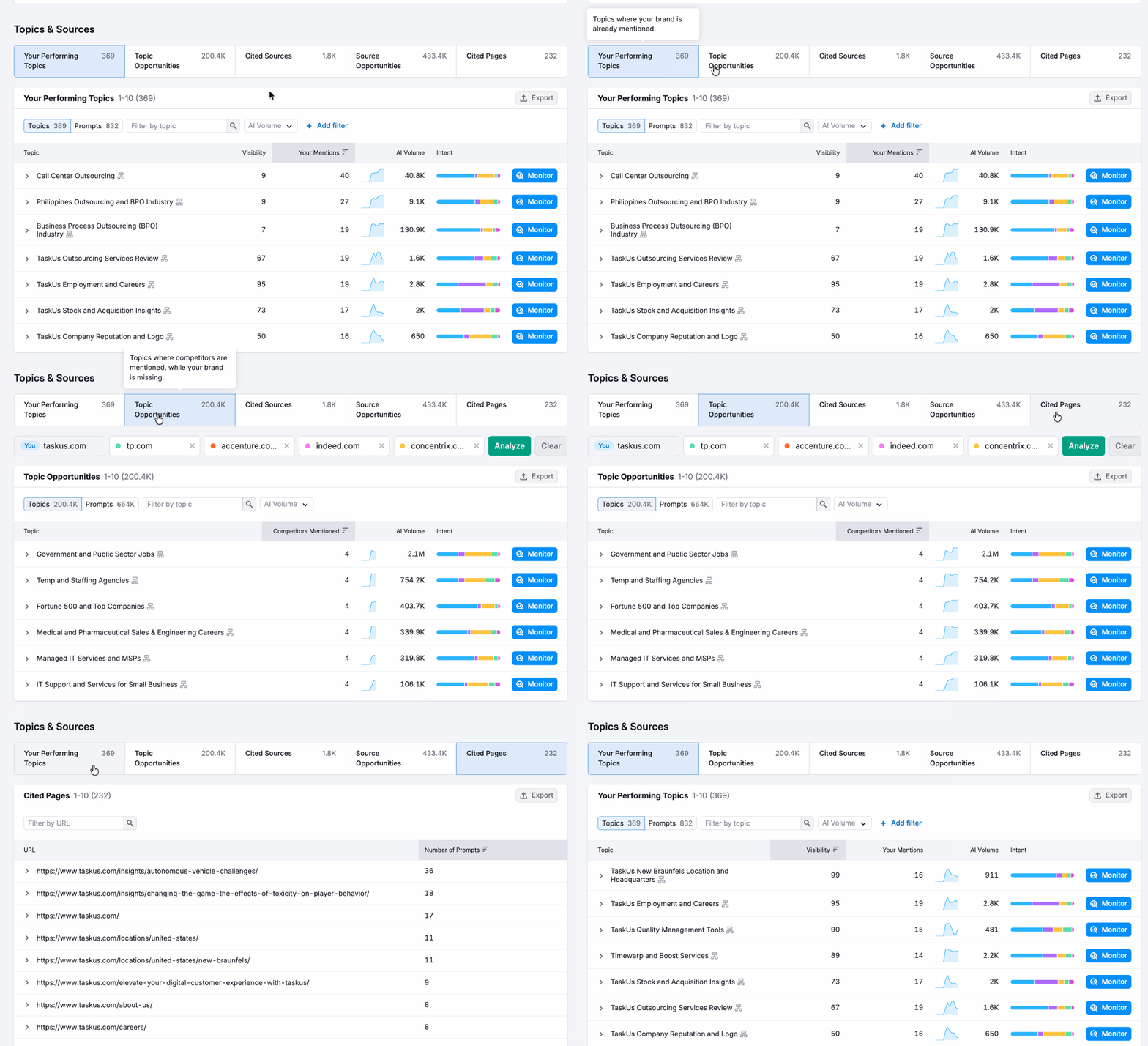
With the Brand Performance reports, you can drill down into how ChatGPT mentions you and your competitors in terms of key business drivers.

Use these gaps to prioritize where to act. If competitors appear more on certain topics, that’s a signal for you to build out content and reviews in that area.
To improve your visibility, focus on earning mentions off-site, answering the questions your audience is already asking, and publishing perspectives only you can offer.
Further reading: How to track your ChatGPT brand visibility with Semrush
How to build a recurring ChatGPT traffic report
A recurring report helps you keep ChatGPT traffic in context. Instead of treating it as a one-off metric, you can monitor it alongside the SEO and conversion data your team already uses.
Automate sending ChatGPT traffic reports with GA4
If you’re just using Google Analytics to measure ChatGPT traffic to your site, you can set up an automated report to share this with your stakeholders.
Go to your filtered Traffic Acquisition report, and follow these steps:
- Find the “Share report” button above the graph
- Choose “Schedule email”
- Name your report, add recipients, and set the frequency

Now, your recipient will get a recurring email report on ChatGPT traffic coming to the site.
Automate your reporting with Semrush My Reports
Semrush also makes it easy to report on ChatGPT traffic with the My Reports PDF builder. The benefit of using this tools is that you can customize a more thorough report that includes ChatGPT traffic as well as additional AI visibility metrics like AI visibility score, citations, mentions, and sentiment.
In Semrush, open My Reports and click the GA4 button.

Click the “AI Traffic Overview” widget from “Groups” and drag it over to get a baseline of your ChatGPT traffic alongside traffic from other AI platforms.

The “Top AI platforms” section shows a breakdown by platform.
Next, focus on the data points you’re already monitoring in GA4, such as key events, landing pages, etc.. Drag in those widgets, click the pencil icon at the top of each, and change the “Traffic Channel” drop-down to “AI Referral.”

Include additional AI visibility signals
After adding GA4 data, use the Semrush widgets to include data from Semrush’s Visibility Overview or Brand Performance reports. These AI visibility metrics help explain changes in ChatGPT visibility and presence that could lead to more awareness and traffic.
If you have the Traffic & Market toolkit, you can also include those competitor benchmarks to share how your site’s ChatGPT traffic compares with the competition.
Related: Create an SEO + AI search marketing report [+ template]
ChatGPT traffic isn’t the whole story
Traffic is the end result of a lot of things going right. With signals like mentions, citations, and AI visibility, you can see how you're influencing your likelihood of growing that traffic.
To see the full picture, benchmark your ChatGPT traffic against competitors with Semrush's Traffic & Market Toolkit, then use the AI Visibility Toolkit to track the signals behind it.